






Autosave a text file
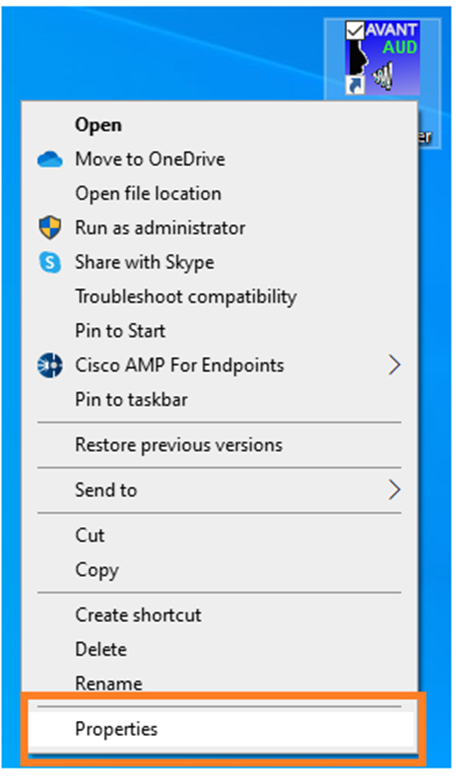
Right click the shortcut icon and select “Properties”
Navigate to the Shortcut tab and modify Target. At the end of target add
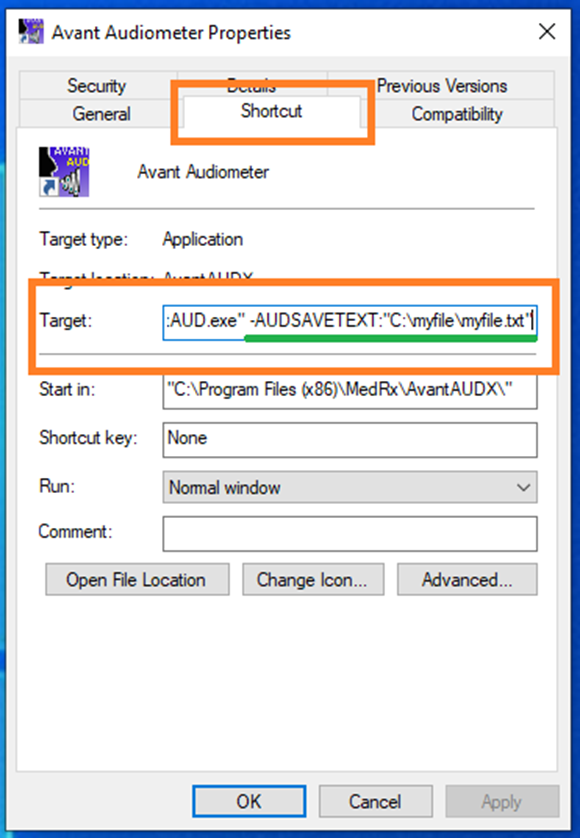
-AUDSAVETEXT:“C:\myfile\ myfile.txt”
This will save an TXT file when you exit Studio.
To View the file navigate to C:\myfile
Optional
3rd party companies can launch MedRx through command line and use this function to autosave files. To do so they would create a Studio button in the software which launches Avant AUD through command line. The code would be:
“%ProgramFiles(x86)%\MedRx\AvantAUDX\AvantAUD.exe” -AUDSAVETEXT:”c:\myfile\myfile.txt”
They can customize the file name with each launch if they wanted to create individual files with identifies as well for example:
“%ProgramFiles(x86)%\MedRx\AvantAUDX\AvantAUD.exe ” -AUDSAVETEXT:”c:\ myfile\Patient###.txt”
Where ### is the patient identifier in the 3rd party company database.
The software would then monitor to the folder and grab the file when the session is complete and immediately delete it.
